Cpx24.com CPM Program

Google Groups 2

Google Groups 2 is now open for BETA users ..

http://google.blogspace.com/archives/001231

Google finally bit the bullet and added mailing list support to Google Groups: Google Groups 2 - BETA. It even lets you create your own mailing list, just like Yahoo! Groups.

Google says:

  • Group creation: Users can easily create, join, and search email-based mailing lists; administrative interface enables customized access controls to designate a group as public or restricted
  • Dynamic conversations: Postings appear within 10 seconds and are indexed within 10 minutes
  • Enhanced user interface: Users can track and mark favorite topics using the "My Groups" feature and view postings in a variety of ways including by message summary, title, or conversation view

Abbyy FineReader 8.0 Professional OCR

ABBYY FineReader OCR 8.0 delivers accurate text recognition quickly, and excels at high-end OCR automation. Abbyy FineReader 8.0 Professional Edition offers a new ability to automate common OCR tasks. It also adds a wealth of new features for making recognition work better for a wider range of originals, most notably text in books, PDF files, and digital photos.


PDF has become the lingua franca of the online document world because Adobe gives away the Reader program free. So it's a good thing that FineReader expands its Adobe Acrobat PDF file capabilities in version 7.0. FineReader not only now supports most available types of PDF, it also exports PDFs and extracts text from PDFs, a capability that turns PDF into an editable file format.

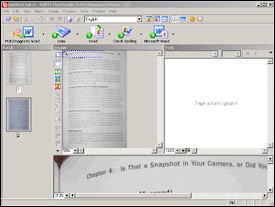
FineReader 8.0, similar in many ways to OmniPage, follows the same design as earlier versions. Its main screen shows thumbnails of pages on the left, a graphic image of the currently selected page in the middle, and an editing pane with recognized text on the right. But FineReader adds a Zoom pane across the bottom that displays a magnified version of the area in the image you're currently editing. You can also send the text to Word to edit and correct, with the Zoom pane still active.

A welcome new feature is the ability to define common OCR tasks to run with a single command. For example, one predefined procedure asks you to pick an image file, then opens the file, recognizes the text, and sends the result to Word. A wizard makes it easy to define your own procedures.

FineReader's speed and accuracy have improved, too, and the software now works hand-in-hand with Microsoft Office 2003. For example, you can scan a document directly into the middle of a Word 2003 document, then use Word's own proofing tools to correct the recognized text. You can also output scanned documents to PowerPoint 2003, making it easy to create presentations from existing documents.

FineReader provides powerful and intuitive features after you’ve become adept with the program and have taught it to work your way. That’s especially true in the Corporate Edition ($599.99 per concurrent license, reviewed here), in which you can fully automate batch scan scheduling using a Hot Folder without manually invoking FineReader. Professionals and small businesses that don’t demand networked scanning access and the more automated features will prefer the pocketbook-friendlier Professional Edition ($399.99). Either way, expect more of a learning curve than for lower-end OCR alternatives that serve move casual users.

The company also touts a number of enhancements when extracting text from PDF files, including, perhaps optimistically, a speed increase of up to 200 percent. Other new features include recognition of hyperlinks in scanned text, and defining file properties such as author and keywords when saving output to HTML, XML, PDF, .doc, and Microsoft Reader’s e-book .lit formats.

The notable installation exception is that FineReader 7.0 now requires product activation. If you're connected to the Internet, it's simple to complete this copy-protection step. If you can't connect to the Internet, however, FineReader will run--in a crippled state that won't save or print recognized text.

The FineReader interface makes basic OCR tasks as simple or as complex as you'd like. Right below the standard menu bar, you'll find a toolbar with five large icons. One launches several one-step scan and read operations, ideal for beginners who need help wading through many OCR options. The other four buttons control individual steps, letting you scan, read, proofread, and save the recognized pages as a document. More-experienced OCR users will find that additional toolbars provide quick access to advanced functions such as recognition zone adjustments, image editing, and rotation.

Technical support for Abbyy FineReader is very good; Abbyy offers free support for registered users for the life of the product. The company's online technical support site offers a wealth of useful information, including a list of tested and supported scanners. You can also contact the company for technical support by e-mail or by phone. Phone support is available via a toll call Monday through Friday, 9 a.m. to 5 p.m. PT.

If you do a lot of optical character recognition and require a high-end solution, the latest ABBYY FineReader OCR is tough to beat. A side-by-side display of the original image and FineReader's text capture makes it easy to proofread the program's output.

Google Adsense Website Error Page

The Google AdSense website is temporarily unavailable. Please try back later.
We apologize for any inconvenience.

Google AdSense の web サイトは一時的にご利用いただけません。後で再度お試しくださいますようお願いいたします。
お手数をおかけいたしますことをお詫びいたします。

Die Google AdSense-Website ist vorübergehend nicht verfügbar. Bitte versuchen Sie es später noch einmal.
Wir entschuldigen uns für eventuell enstandene Unannehmlichkeiten.

Le site Google AdSense est temporairement indisponible. Veuillez réessayer plus tard.
Nous vous prions de nous excuser pour le désagrément occasionné.

El sitio web de AdSense de Google no se encuentra disponible en estos momentos. Por favor, inténtelo de nuevo más tarde.
Disculpe las molestias.

Google AdSense 网站暂时无法浏览。请您侍候再尝试。
对于造成您的不便我们感到抱歉。

Il sito AdSense di Google è temporaneamente non disponibile. La preghiamo di provare più tardi.
Ci scusiamo per il disagio.

De website van Google AdSense is tijdelijk niet beschikbaar. Probeert u het later opnieuw.
Onze excuses voor het eventuele ongemak.

Google AdSense Sayfası geçici olarak hizmet dışıdır. Lütfen, daha sonra tekrar deneyin.
Bu geçici sorundan dolayı özür dileriz.

O site do Google AdSense não está disponível no momento. Tente novamente mais tarde.
Pedimos desculpas pelo inconveniente.

The Google AdSense website is temporarily unavailable. Please try back later.
We apologise for any inconvenience.

Witryna programu Google AdSense jest chwilowo niedostępna. Prosimy spróbuj później.
Przepraszamy za wszelkie niedogodności.

Веб-сайт Google AdSense временно недоступен. Попробуйте, пожалуйста, еще раз через несколько минут.
Мы приносим свои извинения за причиненные неудобства.

Google AdSense webbplats är för tillfället inte tillgänglig. Försök igen senare.
Vi ber om ursäkt för eventuellt besvär.

Google AdSense-webstedet er ikke tilgængeligt i øjeblikket. Prøv igen senere.
Vi beklager ulejligheden.

Google AdSense 웹사이트를 일시적으로 사용하실 수 없습니다 . 나중에 다시 시도해 보십시오 .
불편을 끼쳐드려 죄송합니다 .

Google AdSense-webområdet er midlertidig utilgjengelig. Prøv igjen senere.
Vi beklager eventuelle problemer dette medfører.

Google AdSense 網站暫時無法流覽。請您侍候再嘗試。
對於造成您的不便我們感到抱歉。

A Google AdSense oldal jelenleg nem elérhető. Kérjük, látogasson vissza később.
Elnézést kérünk az esetleges kellemetlenségekért.

Google AdSense –sivusto ei väliaikaisesti ole saatavilla. Yritä myöhemmin uudelleen.
Pahoittelemme tämän aiheuttamaa hankaluutta.

Stránka Google AdSense je dočasně nedostupná. Zkuste to později.
Omlouváme se za způsobené nepříjemnosti.

Stránka Google AdSense je dočasne nedostupná. Skúste neskôr, prosím.
Ospravedlňujeme sa za spôsobené nepríjemnosti.

Google AdSense sučelje trenutno je nedostupno. Molimo Vas pokušajte docnije.
Ispričavamo se za neugodnosti.

A cute little girl - Tanvi


Check pictures of Amit Agarwal

Windows Media Player 10

http://thomashawk.com/2004/09/windows-media-player-10-good-bad-and.html

Thomas Hawk's review: WMP 10 - The Good, The Bad and the Ugly.

Folder Redirection

Meryl Evans writes about this great utility called TweakUI (freeware)

I never use Microsoft Window’s default settings of My Documents, My Pictures, or My Music. I change it up on my own or use TweakUI, a Windows PowerToy. For home users, there is no compelling reason to change the defaults. I do it because I have my way of doing things and organizing. For business users or networked environments, it’s a good idea to redirect folders because of the backup system and use of network…

http://channels.lockergnome.com/windows/archives/20040906_folder_redirection.phtml

Microsoft Streets And Trips 2006 with GPS Locator

Microsoft Corp. today announced the availability of Microsoft Streets & Trips 2006 with GPS Locator, the latest version of the best-selling mapping and travel planning software for the United States and Canada. Microsoft Streets & Trips 2006 with GPS Locator introduces Voice-Prompted Directions, a hands-free option that reassures travelers with turn-by-turn directional information so everyone in the car can enjoy the ride without the stress of getting lost. For running errands around town, taking a family road trip, finding the way around a new city or planning a day of business meetings, Streets & Trips 2006 with GPS Locator offers easy-to-use tools to plan personalized trips and travel with confidence.
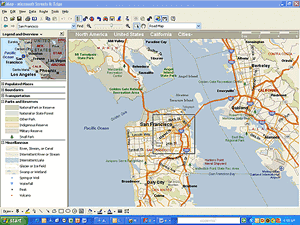
Microsoft Streets and Trips 2006 is a slick mapping program that's great for planning weekend getaways, cross-country treks, and other vehicular excursions. This year's version displays about 5.9 million miles of roads, plus another 1.8 million points of interest, including ATMs, museums, restaurants, and zoos. Impressive sounding, perhaps, but DeLorme Street Atlas USA 2006 shows more eateries and attractions, a fact we learned when using both programs to explore various U.S. cities.

Example: In a square block of downtown San Francisco west of Moscone Center, Streets and Trips shows only 4 points of interest, while Street Atlas USA displays 11. Free mapping services, such as Google Local, also help to make Streets and Trips a tough sell. If ease of use is critical in a software-based atlas, Microsoft Streets and Trips is your best choice. If you want a mapping program that shows the most restaurants, hotels, and other roadside attractions, DeLorme Street Atlas USA 2006 is the better pick.

Microsoft Streets and Trips 2006 offers some enticing extras like a the link to MSN Virtual Earth, Microsoft's online repository of satellite maps. Let's say you're viewing a map of San Francisco's Union Square and you want a bird's-eye view of it. Click the Virtual Earth icon at the top of the screen, and a satellite image of Union Square loads in your browser. Granted, this may be fluff, but it's fun. Far more useful are the (optional) GPS-related upgrades, particularly the new voice directions--crucial for using Streets and Trips while driving. (We'll examine the GPS features in a separate review.) If you don't have a GPS transponder but do have a Wi-Fi connection, the new Locate Me feature can utilize Wi-Fi hot spots to estimate your location. Naturally, you'll first have to be inside a Wi-Fi hot-spot range for this feature to work.


Microsoft Streets and Trips 2006 provides a better interface than DeLorme Street Atlas USA 2006. To view a city map, for instance, you simply type its name in the Find box. By comparison, Street Atlas makes you enter start and finish locations in separate windows, then it calculates the route before displaying a map--a slower approach. And it's easier in Streets and Trips to load sections of a map not on the screen--just click near the edge of the map window. The same task in Street Atlas requires an annoying click-and-drag procedure, which gets tiresome after a few tries. Not that online mapping services are any better, as is evident from a real-life comparison of online mapping capabilities.

Another new tool called Night Map Style is like wearing night-vision goggles. The map's background is pitch black, and roads and street names are shown in shades of green. It's convenient for night driving and other low-light conditions, although most of the background detail, including points of interest icons, aren't visible. We prefer the conventional map view, which is easy to read on a backlit laptop at night. Your visual preferences may vary.

Microsoft's support for Streets and Trips 2006 is very pretty generous. Streets and Trips includes one year of unlimited e-mail and toll-free telephone support--almost unheard of in software technical support. Microsoft promises e-mail responses within one business day. Microsoft also provides a searchable knowledge base dedicated to Streets and Trips 2006, as well as blogs, chats, and newsgroups, all available online.

System Requirements for Microsoft Streets & Trips 2006 with GPS Locator: Microsoft Windows Server 2003, Microsoft Windows XP Home Edition, Microsoft Windows XP Professional, Microsoft Windows 2000 Professional, Microsoft Windows 98 Second Edition, Microsoft Windows Millennium Edition

Microsoft Street & Trips with GSP is available for US, UK, Germany and Italy.