Windows security checklist (kottke.org): "Windows security checklist"
8 steps to better Windows security
1. Run Windows Update regularly.
2. Install ZoneAlarm (Firewall)
3. Buy and install NOD32 (Anti-Virus)
4. Install WinPatrol (Anti-Hijack)
5. Buy and install AdMuncher (Ad and Popup Blocker)
6. Install and run AdAware (Anti-Spyware)
7. Replace Internet Explorer and Outlook Express with Firefox & Thunderbird
8. Disable Autorun.

Export Captivate Movie to Macromedia Flash 8
To export a Captivate movie to Flash, you should have Macromedia Flash MX 2004 installed.
Since Macromedia Captivate 1.0 is designed to export to Flash MX 2004, when exporting to Flash 8 in Macromedia Captivate, you can receive an error message like the one above. Macromedia Captivate 2.0 may solve this issue but till then, follow this:
Although Captivate is designed to export only to Flash MX 2004, you can import your Captivate project into Flash 8 by following the directions below:
1. Close Flash 8 if it is open.
2. Open Windows Explorer.
3. Navigate to:
C:\Program Files\Macromedia\Captivate
4. Copy the RDMFISTUB.dll file.
5. Navigate to:
C:\Documents and Settings\username\Local Settings\Application Data\Macromedia\Flash 8\en\Configuration
Note: The 'Local Settings' folder by default is hidden. If you are unable to locate the 'Local Settings' folder you can unhide it by opening Windows Explorer, select Tools > Folder Options > View, and select the option to 'Show hidden files and folders'.
6. Create a new folder called Importers. Your final path should look like this:
C:\Documents and Settings\username\Local Settings\Application Data\Macromedia\Flash 8\en\Configuration\Importers
7. Paste the RDMFISTUB.dll into the Importers folder.
8. Open Flash 8.
9. Create a New Flash Document.
10. Select File > Import > Import to Stage.
11. Browse to and select the CP file.
12. Click OK.
Note: Mouse movements will not be preserved when importing to Flash 8. The beginning and ending mouse placements will be imported, but the motion tweens for the movements will need to be recreated.
Since Macromedia Captivate 1.0 is designed to export to Flash MX 2004, when exporting to Flash 8 in Macromedia Captivate, you can receive an error message like the one above. Macromedia Captivate 2.0 may solve this issue but till then, follow this:
Although Captivate is designed to export only to Flash MX 2004, you can import your Captivate project into Flash 8 by following the directions below:
1. Close Flash 8 if it is open.
2. Open Windows Explorer.
3. Navigate to:
C:\Program Files\Macromedia\Captivate
4. Copy the RDMFISTUB.dll file.
5. Navigate to:
C:\Documents and Settings\username\Local Settings\Application Data\Macromedia\Flash 8\en\Configuration
Note: The 'Local Settings' folder by default is hidden. If you are unable to locate the 'Local Settings' folder you can unhide it by opening Windows Explorer, select Tools > Folder Options > View, and select the option to 'Show hidden files and folders'.
6. Create a new folder called Importers. Your final path should look like this:
C:\Documents and Settings\username\Local Settings\Application Data\Macromedia\Flash 8\en\Configuration\Importers
7. Paste the RDMFISTUB.dll into the Importers folder.
8. Open Flash 8.
9. Create a New Flash Document.
10. Select File > Import > Import to Stage.
11. Browse to and select the CP file.
12. Click OK.
Note: Mouse movements will not be preserved when importing to Flash 8. The beginning and ending mouse placements will be imported, but the motion tweens for the movements will need to be recreated.
Get A Gmail Account
Do you want a free Gmail inviation code ? ISNoop can help you.
The isnoop.net's gmail invite spooler offers a place for people with Gmail invites and those who want them to come together with minimal effort and fuss.
The isnoop.net's gmail invite spooler offers a place for people with Gmail invites and those who want them to come together with minimal effort and fuss.
Firefox: Mulitple startup pages
AndyJarrett.co.uk
If you, like me, initially go to a couple of addresses when you first start a browser session then you'll be glad to know that FF can open these up for you.
If you, like me, initially go to a couple of addresses when you first start a browser session then you'll be glad to know that FF can open these up for you.
Microsoft Calculator Plus
Microsoft Calculator PlusThis application includes mathematical and conversion functions.
Microsoft Calculator Plus is an updated calculator application for Windows XP that you can download at Microsoft Web site. Microsoft Calculator Plus has an improved interface over the standard Calculator that comes with Windows XP. The new calculator also boasts some neat features, including the ability to perform exchange-rate calculations and various types of conversions, such as currency and weight.
The download process checks the version of Windows on your system and doesn't download the program until it has verified that the software is a "genuine" Windows version.

Calculator Plus also includes currency conversion, with a live link to the European Central Bank to ensure that the currency exchange rates used by Calculator Plus are as up to date as possible.
Download Microsoft Calculator Plus
Microsoft Calculator Plus is an updated calculator application for Windows XP that you can download at Microsoft Web site. Microsoft Calculator Plus has an improved interface over the standard Calculator that comes with Windows XP. The new calculator also boasts some neat features, including the ability to perform exchange-rate calculations and various types of conversions, such as currency and weight.
The download process checks the version of Windows on your system and doesn't download the program until it has verified that the software is a "genuine" Windows version.
Calculator Plus also includes currency conversion, with a live link to the European Central Bank to ensure that the currency exchange rates used by Calculator Plus are as up to date as possible.
Download Microsoft Calculator Plus
Autodesk Revit 9, Revit Building 8.1, Autocad 2006, Autocad 2007
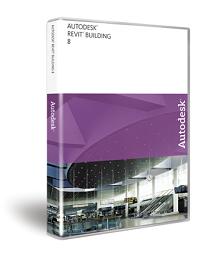 Autodesk will release Autodesk Revit Building 9 and Revit Structure in early 2006. Autodesk Revit Building 8, incorporating state-of-the-art building information modeling (BIM) capabilities that let architects and designers work together on a single holistic representation of a building project, to save time and money in the design process. Autodesk Revit Building 8.1 is a fully integrated geometrical, material, and analytical mod�eling application for structural engineering, analysis, design, and documentation. It is building information modeling (BIM) for structural engineers.
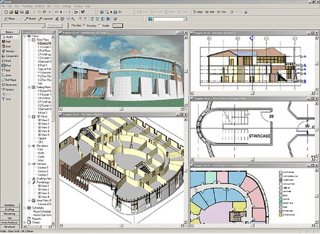
Autodesk will release Autodesk Revit Building 9 and Revit Structure in early 2006. Autodesk Revit Building 8, incorporating state-of-the-art building information modeling (BIM) capabilities that let architects and designers work together on a single holistic representation of a building project, to save time and money in the design process. Autodesk Revit Building 8.1 is a fully integrated geometrical, material, and analytical modÂ�eling application for structural engineering, analysis, design, and documentation. It is building information modeling (BIM) for structural engineers.The Autodesk Revit platform (Autodesk Revit Building 8.1 and Autocad Revit 9.0) is beginning to show some connection with Autodesk Architectural Desktop through the ability of Revit Structure to export and read Architectural Desktop structural objects. Revit Building 8.0 success the highly successful Autodesk Revit 7. The AutoCAD Revit Series 8 includes AutoCAD 2006 and Autodesk Revit Building 8. Autodesk Revit Building supports complete round-tripping of markups with Autodesk® DWF Composer. You can also publish Revit Building models to 3D Autodesk DWF (Design Web Format) file format for high-impact communication of 3D design information.
Autodesk Revit Building provides features that help integrate your work with consultants. The Autodesk VIZ 2005 Interoperability Plug-in for Revit Building lets you import DWG files produced in Autodesk Revit Building and use them to create stunning, photorealistic interior and exterior renderings. You can import or link DWG files directly into Autodesk Revit Building to use as reference geometry or as the starting point for a new design, such as a site plan. Any CAD system that supports the DWG, DGN, or DXF file format can work effectively with Autodesk Revit Building.
With Revit publish to Autodesk Buzzsaw, you can easily convert Autodesk Revit Building files to DWG or DWF format and upload them to Autodesk Buzzsaw project sites. Using default template assignments, you can also assign properties to a view and then set them back to their original state whenever you publish or print your project.
Autodesk is trying to remove cost from the equation by bundling AutoCAD 2006 with Revit 8 for the cost of AutoCAD alone. You must install both on the same system under the joint license arrangement. In order to site license Autodesk Revit Building 8, you must install the Network License Manager onto a server on your Local Area Network. Autodesk Revit Building 8 requires Network License Manager based on FlexLM version 10.1.5 and is not compatible with previous versions of the Network License Manager.
Download Autodesk Revit 7.0 (exe - 48.8 Mb) - Autodesk Revit Building 8 and 8.1 Documentation, Autodesk Revit Building 8 Help Files
Download Autodesk Revit Building 8 (exe - 68.0 Mb (Build Number: 20051017_2000) - Also contains link to Download Autodesk Revit Building 8 Content and Libraries, Download Autodesk Revit Building 8.1 Tutorials, (Metric & Imperial Format) - RevitBuilding8.1_20051017_2000.exe
Try Revit Building Online with Autodesk Revit 7 Streaming Trial - Try Revit 7 and Revit 6 by streaming Autodesk software at no cost. The trial is a fully functional version of Autodesk Revit - including the ability to create, view, save, and plot your own files. This trial is available only in the United States and Canada.
Autodesk Revit Building Related Books
* Autodesk Revit for Building Designers & Architects Release 7.0 by Sham Tickoo
* Mastering VIZ Render: A Resource for Autodesk ADT Users by Paul F. Aubin
* Mastering Autodesk Architectural Desktop by Paul F. Aubin
* Building Construction Illustrated, 3rd Edition by Francis D. K. Ching
* Mastering Autodesk Revit Building by Paul F. Aubin
Download Free Audesk Revit Training Videos in Windows Media Player format from dgcad,com. Revit City (revitycity,com) offers links to Revit Tutorials, Revit Families and other Revit Building Resources.
Autodesk Revit Building 8.1 is available only to Subscription Customers of Revit Building 8.0. With subscription, Autodesk Revit customers receive many benefits, including new releases and technology updates, predictable budgeting, e-Learning tools, and online support. This Web Download of Revit Building 8.1 and AutoCAD Revit Series 8.1 are applicable only to licenses of the English version of Revit Building 8. The Service Pack 1 for Autodesk Revit Series 8.0 requires the original installation CD of Revit Building 8.0, original CD of Revit Building 8.1 or the network image.
With Autodesk Revit Building, you get back to what you love: designing buildings, without your software getting in the way. Work in any view that makes sense, quickly and easily making changes to major design elements. Create comprehensive design proposals in record time. See your ideas visualized on the fly with 3D views and instant shadows. You can even make late-stage changes without worrying about coordinating your plans, schedules, and construction documents. You design it; Revit Building documents it.
Everything you wanted to know about blogging but were afraid to ask
The things they don't tell you about in blogging school
50 tips on how to bog - and some interesting comments too.
1. If you want to start blogging and have huge amounts of traffic instantly I can recommend one of three things: be an established journalist/opinion maker; be Glenn Reynold's brother; or porn. Otherwise face facts: you've got an awfully big hill to climb.
2. Never get your brother to guest blog for you. Trust me.
3. Before you start, read other blogs and get a feel for what they are like. Then completely forget everything you've read and seen so you can establish a new and distinct voice that will get noticed. This also helps a common problem: a really sucky first post. Trust me.
4. Prepare for the reality that the rest of the world may not share your high opinion of yourself and your site.
5. You know that movie where the guy built a baseball field and waited for some dead folks to turn up and play ball? Blogging's like that. Prepare to slog at putting up brilliantly crafted, accurate and to-the-point insights that will proceed to make no difference to anything at all.
Full list here - http://simonworld.mu.nu/archives/037779.php
50 tips on how to bog - and some interesting comments too.
1. If you want to start blogging and have huge amounts of traffic instantly I can recommend one of three things: be an established journalist/opinion maker; be Glenn Reynold's brother; or porn. Otherwise face facts: you've got an awfully big hill to climb.
2. Never get your brother to guest blog for you. Trust me.
3. Before you start, read other blogs and get a feel for what they are like. Then completely forget everything you've read and seen so you can establish a new and distinct voice that will get noticed. This also helps a common problem: a really sucky first post. Trust me.
4. Prepare for the reality that the rest of the world may not share your high opinion of yourself and your site.
5. You know that movie where the guy built a baseball field and waited for some dead folks to turn up and play ball? Blogging's like that. Prepare to slog at putting up brilliantly crafted, accurate and to-the-point insights that will proceed to make no difference to anything at all.
Full list here - http://simonworld.mu.nu/archives/037779.php
Langganan:
Postingan (Atom)